Available nowInvite-only · Starts the morning after you connect

Personal Assistant

Owns the personal admin that piles up: reminders that land, trips on your calendar, research you can act on, errands on the web, and replies drafted in your own inbox.

  • Reports to you, under the name you give it
  • Personal or business workspace
  • Works in your own inbox
  • Phone: none of its own; texts reminders to you

See it work, start to finish

Book a hotel for the Denver conference

  1. You assign · Chat

    “Find three hotels near the convention centre under $250 a night for the 14th to the 16th.”

  2. DidCompared hotels on the webRates, walking distance to the venue and cancellation terms.
  3. DidSent you a short comparisonThree options. Recommended: the Larkspur, $219 a night, a six-minute walk, free cancellation.
  4. Heard backYou chose the Larkspur“Book it, two nights.” It asked to start the errand and you approved.
  5. BlockedStopped at checkoutIt filled in the dates and your details, then handed you the live view to sign in and pay.
  6. DoneStay booked and on your calendarThe confirmation arrived; it added the stay with the cancellation deadline.
  7. Reports back · Morning briefDenver is set
    • The Larkspur, 14th to 16th, on your calendar
    • Free cancellation until the 12th: reminder set for the 11th
    • Your flight isn’t booked yet: want options?

An illustrative scenario. A Personal Assistant prepares web errands for your approval and never pays; you finish checkout yourself.
What it owns

6 available today

Drafts replies to routine personal email in your own inbox, for you to approve. Mail from banks, insurers, doctors and lawyers is skipped before AI reads it.Every day
Sets reminders that reach you when they’re useful, by notification or text, and keeps at it until the thing is done.As you set them
Puts flights and stays on your calendar from the confirmation emails, and watches for changes.Every trip
Researches a question and sends back a short comparison you can act on.When you ask
Works through errands on the web, like a booking form or a cancellation, on its own computer. You approve each errand before it starts and sign in yourself.When you ask
Keeps track of what you promised and what you’re owed, and tells you when something is due.Until it’s done

Things you can hand it

  • “Remind me to renew my passport, and keep at it until it’s done.”
  • “Find three hotels near the venue under $250 a night.”
  • “Put my Denver trip on the calendar and tell me if anything changes.”
  • “Cancel the gym membership I never use.”

What you get back

  • A morning brief: today’s calendar, reminders due and what it handledEvery morning
  • Replies drafted in your inbox, ready to approve or editAs mail arrives
  • A short comparison you can act onWhen you ask
  • Reminders by notification or textWhen they’re due
  • A record of every action, and a weekly account of time savedAlways

What it does alone, and what waits for you

On its own

  • Sorts personal email and prepares drafts
  • Adds trips from confirmation emails to your calendar
  • Researches and reports back
  • Sends you reminders

Waits for your approval

  • Every reply from your own inbox, unless you switch routine replies to automatic
  • Every web errand, before it starts

Brings to you

  • A site that needs you to sign in or pay
  • Anything it can’t finish, with what it tried

Limits

  • No email address or phone number of its own
  • Never pays or puts down a deposit
  • Doesn’t call or text other people

Default controls for this role. Drafts in your own inbox for your approval. Asks before every web errand and never pays for anything. Mail from banks, insurers, doctors and lawyers in your inbox is skipped before AI reads it.

How every employee is supervised: security and controls.

What it needs to start

You connect

  • Your calendar (Google or Microsoft)
  • Your inbox (Gmail or Outlook), when a task needs it

Atona sets up

  • The name you give it
  • Its own computer for web errands, with a live view you can watch or take over

You teach it

  • A few standing preferences, like “never before 9am”
  • Your mobile, verified, the first time it texts you

How it reaches people. No email address or phone number of its own. It drafts in your own inbox for you to approve, and texts reminders only to you.

Accounts and channels

  • Gmail
  • Outlook
  • Google & Microsoft calendar
  • Its own computer for web errands
  • Deep research
  • Notion

How each part works: Email · Calendar · Research · Tasks · Getting started

Where it sits on the ladder

The first rung. An Executive Assistant and a Chief of Staff do everything it does, and more.

Work samples

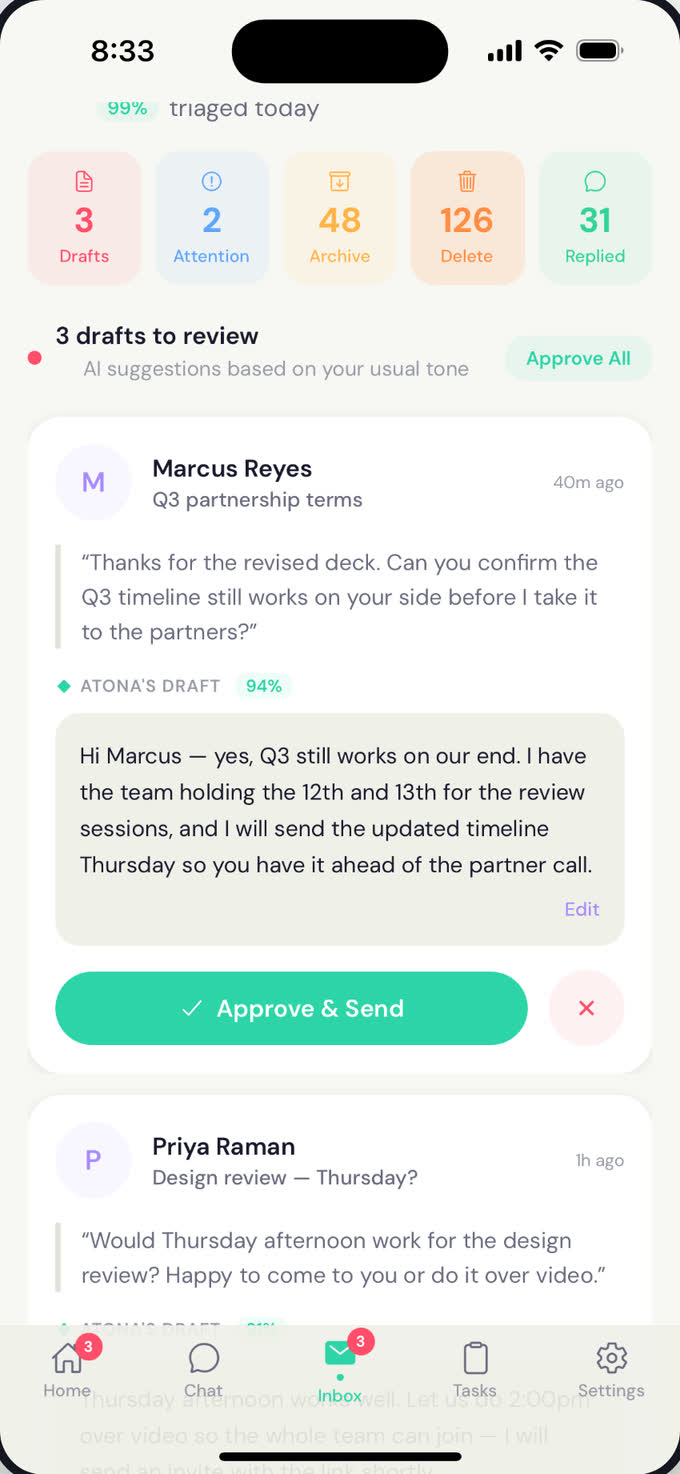
Inbox on iPhone: 99% triaged today, chips for 3 drafts, 2 attention, 48 archive, 126 delete and 31 replied, and a draft reply to Marcus Reyes at 94% confidence with an Approve & Send button.

Inbox on iPhone: 99% triaged today, chips for 3 drafts, 2 attention, 48 archive, 126 delete and 31 replied, and a draft reply to Marcus Reyes at 94% confidence with an Approve & Send button.Atona for iOS · example data

Personal email, triaged: replies to the routine, each one tap from sent.Atona for iOS · example data
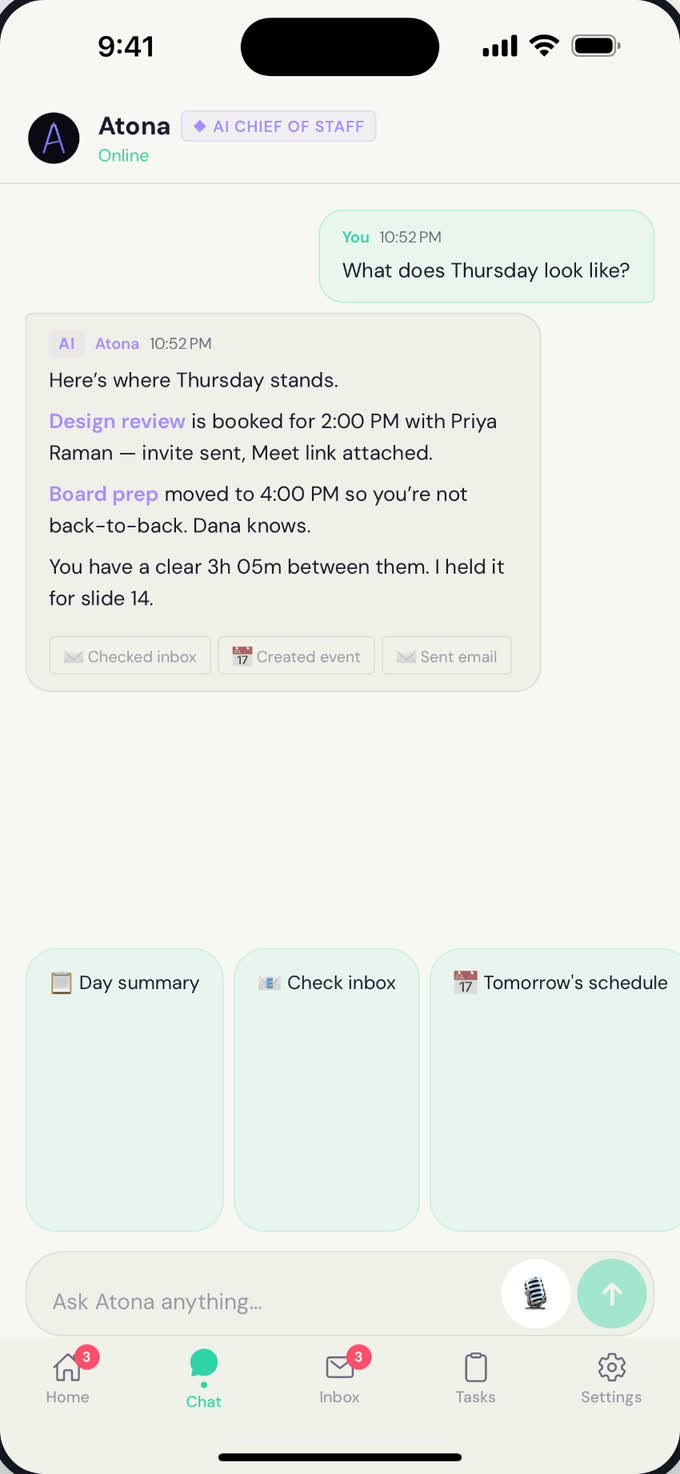
Chat with Atona on iPhone: asked what Thursday looks like, it lists the design review booked for 2:00 PM and the board prep moved to 4:00 PM, with a clear stretch between them held for slide 14.

Chat with Atona on iPhone: asked what Thursday looks like, it lists the design review booked for 2:00 PM and the board prep moved to 4:00 PM, with a clear stretch between them held for slide 14.Atona for iOS · example data

Ask in plain language. It answers from your calendar and what it remembers.Atona for iOS · example data

Work history

No published record for the Personal Assistant on its own yet. Across every role, the beta cohort’s figures are on the homepage, labelled as platform-wide.

Before you hire

Does it get its own email address or phone number?

No. A Personal Assistant works through your own inbox: it drafts, you approve, and the reply goes out as you. Its own address and number start with the Executive Assistant.

Can it call or text other people?

No. It can text reminders to you once you’ve verified your mobile. Calls and texts to other people are the Executive Assistant.

Can it spend money?

No. It can fill in a booking or a form on the web, but checkout is yours: it hands you the live view and you pay. Purchases, with your approval at checkout, start with the Chief of Staff.

Does it read my banking or medical email?

Mail in your inbox from banks, tax offices, insurers, healthcare providers and law firms, or with subjects like statements, tax forms and one-time codes, is recognised by its sender and subject and skipped before the AI that reads and drafts sees it. When a message’s body looks like it holds personal identifiers, a short excerpt is checked by a classification model first.

How do I get access?

Request access from this page. You create an account, then enter an invitation code if you have one, or tell us what you need. The Atona team reviews every request and replies by email.

What happens once I’m in?

You choose the Personal Assistant, give it a name, connect your calendar and hand it a first task. Its first brief arrives the next morning.

Request your Personal Assistant.

Atona is invite-only. Request access with an invitation code, or tell us what you need. Once you’re in, your Personal Assistant starts the morning after you connect your calendar.

Already have access? Sign in · Android in beta.