Available nowInvite-only · Starts the morning after you connect

Chief of Staff

Does everything an Executive Assistant does, plus multi-week plans it carries across email, calls and texts, follow-ups with the people who owe you, and purchases with your approval.

  • Reports to you, under the name you give it
  • Personal or business workspace
  • Its own, at assistant.atona.ai
  • Phone: its own, set up when a task needs it

See it work, start to finish

Get the signed SOW from Cascade

  1. You assign · Chat

    “Chase the signed SOW from Cascade every week until it lands.”

  2. DidFollowed up with Elena at CascadeFrom its own address, you copied. Recorded: Cascade owes the signed SOW.
  3. Heard backElena replied“Legal wants net 45 on the payment terms.”
  4. Asked youAsked you about the payment termsNet 30 or net 45? It doesn’t agree commercial terms for you.
  5. DidSent your answer and set the next check-in“Net 30, as agreed.” Next nudge Monday if nothing arrives.
  6. DoneThe signed SOW arrivedFiled with the thread. The commitment is closed and the plan is done.
  7. Reports back · Morning briefCascade: signed
    • Signed after two follow-ups and one question to you
    • The kickoff call isn’t booked yet: want times?
    • Two plans still open: the office move and the speaker slides

An illustrative scenario. The morning brief screen is a real Atona for iOS capture with example data.
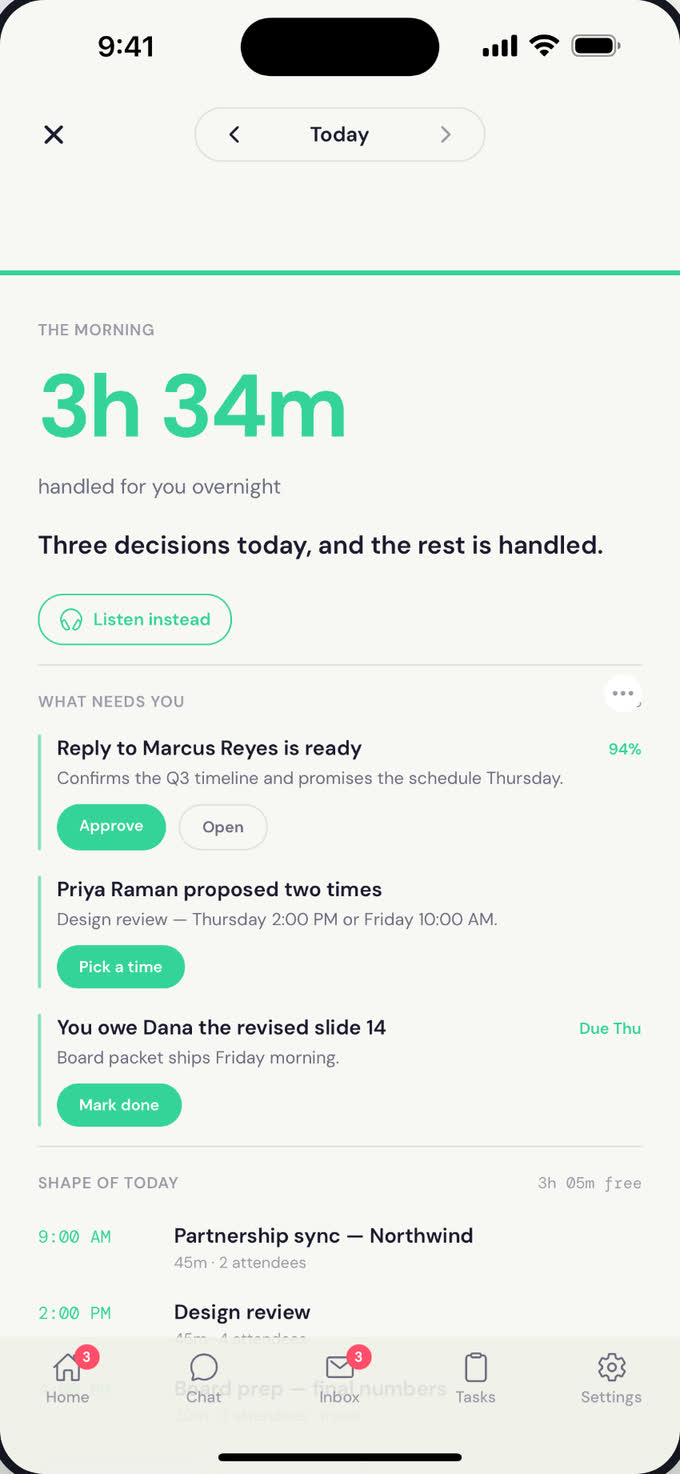
The Morning brief on iPhone: 3h 34m handled for you overnight, three decisions that need you with Approve, Pick a time and Mark done buttons, and the shape of today.

The Morning brief on iPhone: 3h 34m handled for you overnight, three decisions that need you with Approve, Pick a time and Mark done buttons, and the shape of today.Atona for iOS · example data

What it owns

5 available today · 1 in early access

Runs a plan over days or weeks, like onboarding a client or chasing a stalled deal, across email, calls and texts without losing the thread.Until it lands
Follows up with whoever owes you something, from its own address with you copied, on the schedule you set.When something slips
Records every commitment, its own and other people’s, and won’t close a plan while one is still open.Every plan
Reaches people on WhatsApp, through Atona’s business number, when that’s where they answer.When it helps
Buys what a plan needs on the web, after you approve the checkout.When you approve
Plus everything an Executive Assistant does

Not available yet

Sends a Friday account of what moved, what stalled and who owes what.Early access

Things you can hand it

  • “Chase the signed SOW from Cascade every week until it lands.”
  • “Get three quotes for the office move and line up the walkthroughs.”
  • “Make sure every speaker sends their slides by Friday.”
  • “Order the conference badges once Dana signs off the design.”

What you get back

  • A plan you can follow: who owes what, and what happens nextEvery plan
  • Follow-ups sent and replies chased, with you copiedUntil it lands
  • A note the moment something needs your decisionWhen it’s stuck
  • A Friday account of what moved, in early accessFridays
  • Plus everything an Executive Assistant delivers

What it does alone, and what waits for you

On its own

  • Follows up with the people on a plan, on the schedule you set
  • Moves a plan forward across email, calls and texts

Waits for your approval

  • Every purchase, at checkout
  • Anything that commits you to something new

Brings to you

  • A plan that stalls past its date
  • A reply that needs your judgment, like terms or money

Limits

  • Doesn’t sign contracts or agree terms for you
  • Pays only through a checkout you approved
Also included, from the Executive Assistant

On its own

  • Coordinates times with other people from its own address
  • Answers calls from people it knows
  • Joins the meetings you invite it to and sends the notes

Waits for your approval

  • Every call it places
  • A reservation that needs a deposit or card hold
  • Each expense draft

Brings to you

  • A caller it doesn’t know: voicemail, then you
  • A time nobody can make
Also included, from the Personal Assistant

On its own

  • Sorts personal email and prepares drafts
  • Adds trips from confirmation emails to your calendar
  • Researches and reports back
  • Sends you reminders

Waits for your approval

  • Every reply from your own inbox, unless you switch routine replies to automatic
  • Every web errand, before it starts

Brings to you

  • A site that needs you to sign in or pay
  • Anything it can’t finish, with what it tried

Default controls for this role. Outreach you ask for goes out from its own address with you copied; switch any plan to approval to see each message first. Asks before every call it places, every web errand and every purchase.

How every employee is supervised: security and controls.

What it needs to start

You connect

  • Your calendar and your inbox

Atona sets up

  • Everything an Executive Assistant gets
  • WhatsApp, through Atona’s business number

You teach it

  • Your priorities, asked in its first task
  • How often to chase, and when to stop and ask you

How it reaches people. Everything an Executive Assistant has: its own address once your email is verified, and its own number when a task first needs one, after you verify your mobile. WhatsApp goes through Atona’s business number.

Accounts and channels

  • Gmail
  • Outlook
  • Google & Microsoft calendar
  • Its own email addressonce your email is verified
  • Its own phone numberwhen a task first needs it
  • Meeting notetaker
  • WhatsApp, via Atona’s business number
  • iMessage via your Mac
  • Its own computer for web errands
  • Deep research
  • Notion

How each part works: Morning brief · Workflows · Tasks · Outreach · Memory

Where it sits on the ladder

A Chief of Staff does everything an Executive Assistant does, which includes everything a Personal Assistant does, plus the responsibilities below.

Work samples

The Morning brief on iPhone: 3h 34m handled for you overnight, three decisions that need you with Approve, Pick a time and Mark done buttons, and the shape of today.

The Morning brief on iPhone: 3h 34m handled for you overnight, three decisions that need you with Approve, Pick a time and Mark done buttons, and the shape of today.Atona for iOS · example data

The morning brief: what it handled overnight and the three decisions that need you.Atona for iOS · example data
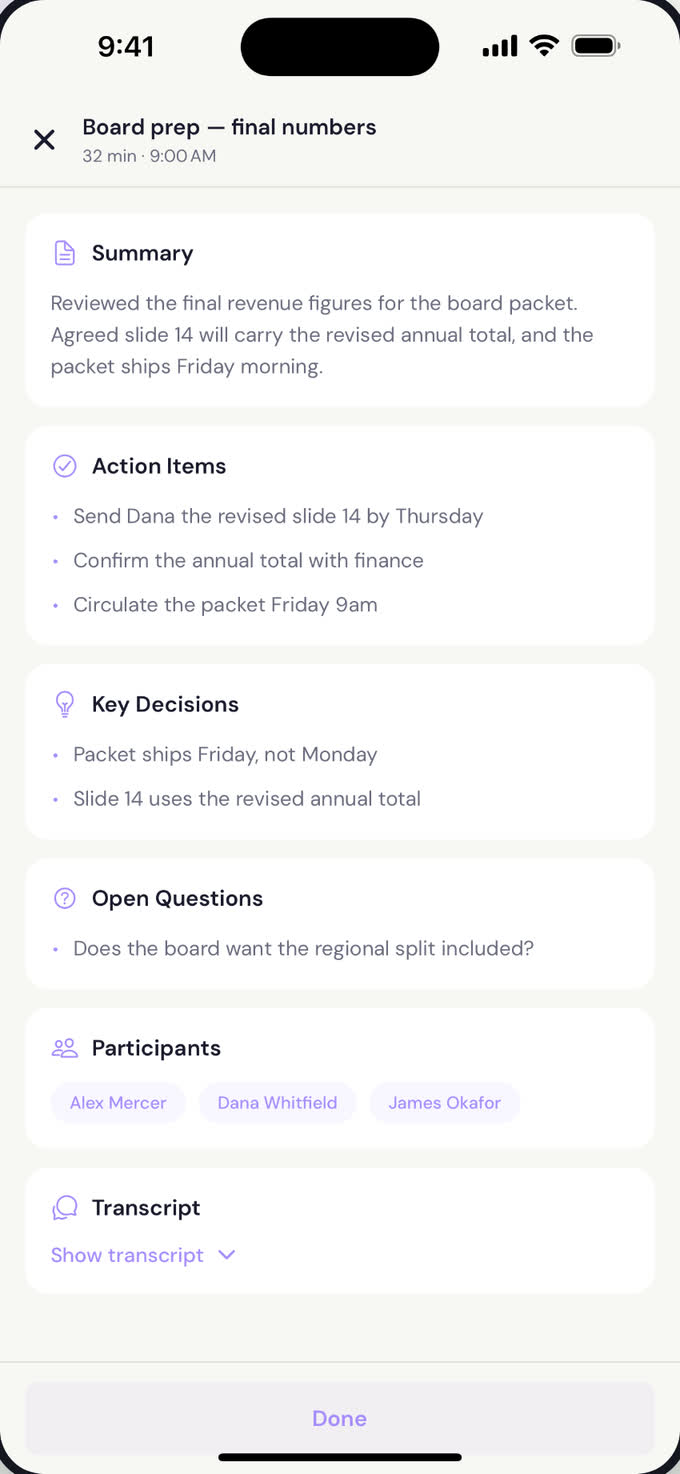
Meeting notes for “Board prep: final numbers”: a summary, three action items, two key decisions, one open question, and the participants.

Meeting notes for “Board prep: final numbers”: a summary, three action items, two key decisions, one open question, and the participants.Atona for iOS · example data

After a meeting it joined: summary, action items and decisions, sent to the room.Atona for iOS · example data

Work history

No published record for the Chief of Staff on its own yet. Across every role, the beta cohort’s figures are on the homepage, labelled as platform-wide.

Before you hire

Will it contact people without asking me?

When you ask it to reach someone, that request is the go-ahead: it writes from its own address, signed as your AI assistant, and copies you. If you’d rather see every message first, switch outreach to approval for all plans or just one.

What does “follows work through” mean?

It holds a plan over days or weeks: who owes what, when it was promised and what happens next. It chases, waits or asks you, records every commitment, and won’t mark a plan done while one is still open.

Can it buy things?

Yes, on the web, and only after you approve the checkout. Deposits and card holds always wait for you.

Can it run a team’s weekly status?

That is a team workspace, in early access and set up with the Atona team. Tell us about your team when you request access.

How do I get access?

Request access from this page. You create an account, then enter an invitation code if you have one, or tell us what you need. The Atona team reviews every request and replies by email.

What happens once I’m in?

You choose the Chief of Staff, give it a name, connect your calendar and hand it a first task. Its first brief arrives the next morning.

Request your Chief of Staff.

Atona is invite-only. Request access with an invitation code, or tell us what you need. Once you’re in, your Chief of Staff starts the morning after you connect your calendar.

Already have access? Sign in · Android in beta.